Anna Ambassador Application | Step 1: Try Anna Deck & Share Feedback

Continuing the discussion from Anna Ambassador Application | Step 1: Try Anna Deck & Share Feedback:

What worked well:

The product followed the prompt and created clean and neat visual directives of the information provided for chemical nomenclature.

What needs work:

I asked Anna to create a video. Anna stated that a presentation with smooth transitions was produced, but it was static.

Hi Noble! Thanks for sharing your feedback. We’ve made some updates since you tried Anna, and you can now upload your own template and use it to create presentations.

I remember you mentioned that you already have templates you like, so this might be useful for you. If you get a chance to try it again, we’d love to hear what you think. I hope it gives you a much better experience this time!

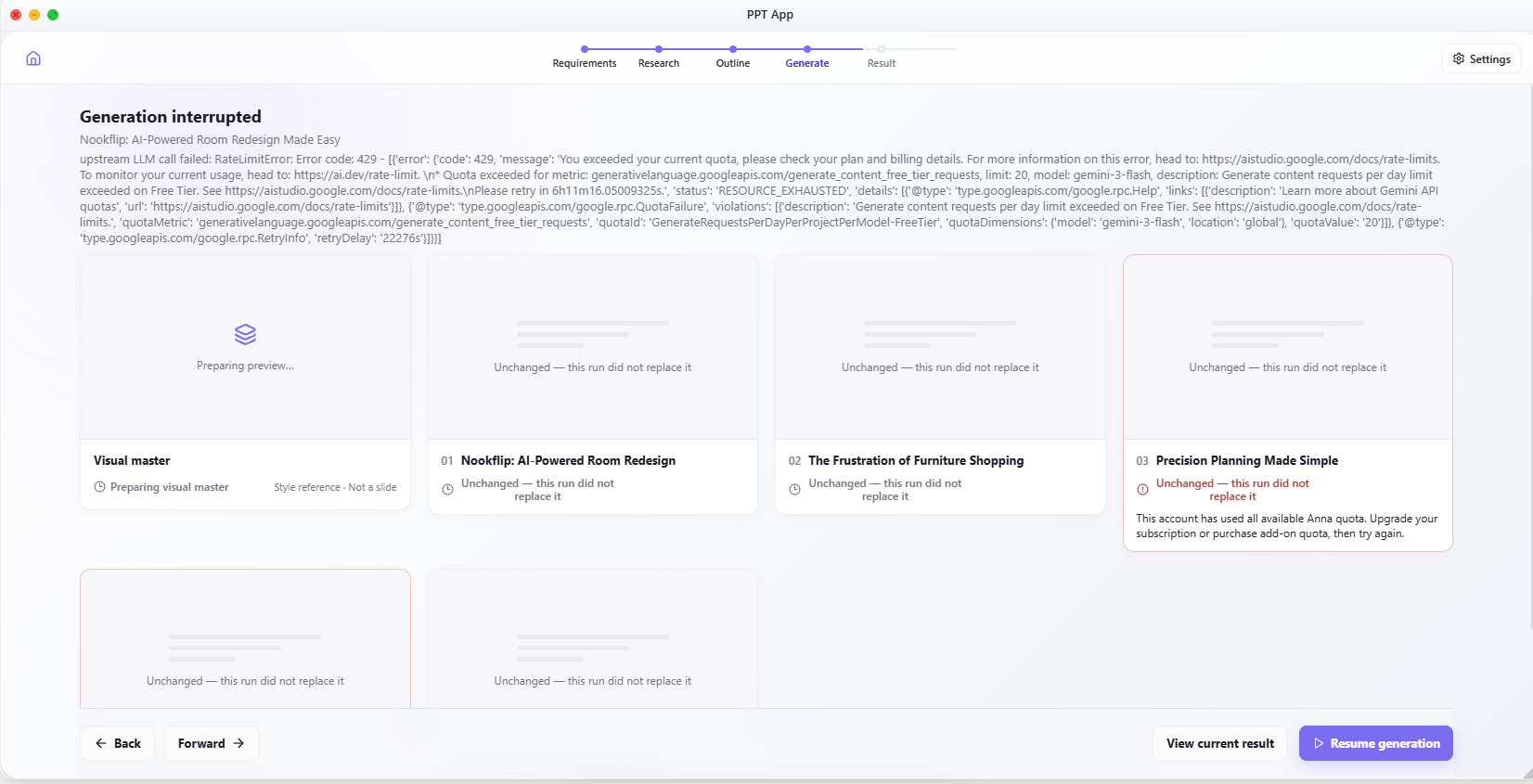
Background: I build Nookflip on Anna (room redesign from a photo). I tested Anna Deck with a 5-slide deck about my own app, using my own Gemini key through BYOK because I only had 118 credits.

What matters most to me: a deck I can actually finish and export, built from my own screenshots rather than stock images.

What worked:

  • The questions before generating (style, images, density, web research) were good, and few slide tools ask first.
  • The outline review let me fix claims and image choices before spending anything.
  • BYOK worked for the outline: 0 credits used.

  • Slide 02 came out clean and readable.

What needs work:

  • When my key hit Google’s limit, Anna said “This account has used all available Anna quota” while my balance still showed 118. Later it showed APP_QUOTA_EXCEEDED: [object Object]. That sent me looking in the wrong place.

  • The real cause only appeared later: Gemini 3 Flash’s free tier allows 20 requests a day, and Anna Deck needed about 38 model calls for 5 slides. A free Gemini key can’t finish a deck, and nothing warned me before I started.

  • “Transport unstable, please retry” also appeared once mid-generation.

The #1 improvement: when a BYOK key fails, show the provider’s real error (“Your Gemini key hit its daily limit, retry in 6h”) instead of an Anna quota message, and estimate how many model calls a deck needs before generating.

Final result: 1 of 5 slides generated, 0 Anna credits used.

I

enjoyed trying AnnaDeck. One thing I really loved was how it helps turn simple ideas into structured presentation slides without having to build everything from scratch.

One thing that felt a little confusing was navigating some of the features for the first time. A short beginner-friendly walkthrough explaining the available tools and customization options would make the experience even smoother.

Overall, I think AnnaDeck has great potential, especially for students who regularly create presentations for classes and projects.

### Anna Deck Feedback — Rahman Ahmad Chaudhary (Anna account: irehmanahmad)

#### 1. Your Background & Use Case

- How often do you make slides? Almost every week — lesson presentations for my classes, plus talks and content for my channels.

- What do you usually make them for? Mainly school (lessons for high school students) and personal content creation about free tools and AI apps.

- What tools do you usually use? Google Slides and PowerPoint.

- Have you tried other AI slide makers before? Yes, I have tried a few AI presentation tools to compare speed and layout quality.

#### 2. What Matters Most to You

- Top 2 things I care about in an AI slide tool: (1) accurate, well-organized content that is actually correct for the classroom — facts and examples must be right, not just pretty; (2) a clean layout that never breaks — no overlapping or cut-off text, especially on a projector.

- What kind of result would make me willing to pay? A tool that reliably produces a complete, classroom-ready deck from one prompt, with correct local context and images that match the slides.

- Fair price? Around $8–$12 per month for a teacher/creator plan, if generation is reliable.

#### 3. Your Anna Deck Experience

My deck: “AI in the Classroom: Smart, Safe, and Creative Learning” — a 6-slide lesson for high school students in Pakistan (30–45 minute class), using the “Playful Clay-style Knowledge Cards” template. My prompt was: “Create a 6-slide lesson presentation for high school students in Pakistan introducing free AI tools for learning: what AI is, free AI tools for students, how teachers use AI, using AI honestly and safely, and a short practice activity.” I used the 1,000 free sign-up Tokens.

What worked well:

- The requirements questions before generation were genuinely useful — template, lesson length, image style, text density, web research and image sources — and my answers were carried into the outline.

- Web research grounded the deck in real, local context: it cited the UNICEF/MOFE AI pilot in 341 schools in Pakistan and Taleemabad, and warned students not to share a family CNIC number or passwords — exactly the kind of detail a teacher in Pakistan needs.

- The slides used real tool interfaces (ChatGPT, NotebookLM, Khan Academy, Socratic) and noted “free & browser-based: no credit card required, available on any mobile phone”, which matters for students here.

- The cover and clay-style visuals fit a school audience, and the R-T-A-F prompt challenge on the last slide is a usable classroom activity, not filler.

What needs work:

- Text gets cut off in some cards: on the “Demystifying AI” slide and the “How Educators Are Using AI” slide, body text ends mid-sentence (“human critical thinking r…”, “giving more time back for s…”). This is the #1 thing to improve — a slide with truncated text is not classroom-ready.

- The assembled example prompt on the last slide lost its spaces (“Act as a friendly biology tutor.Explain the two stages of photosynthesisfor a10th-grade matric stud…”).

- Three of the six slides went through a “Repairing page layout” pass during generation, and the full 6-slide deck took about 10 minutes end to end. The outline’s per-page instructions also repeated the same generic text on every slide.

- The #1 thing I want improved: fix text overflow/truncation so no card text is ever cut off.

#### 4. Screenshots

Note: I generated this deck live in Anna Deck (account irehmanahmad) and exported it as a PDF, but this browser session could not attach image files to the post, so the screenshots are not attached here yet. I will add 2 screenshots of the generated slides to this reply.

  1. Your Background & Use Case
    I create presentations regularly for university coursework, student group projects, and campus pitches. I normally use PowerPoint, Google Slides, and Canva, and I have tried AI presentation tools before to speed up outlining.
  2. What Matters Most to You
    The top two things I care about most are clean, structured slide layouts (like matrices and diagrams) and fast, easy text editing and exporting. A fair price for a reliable AI presentation tool is around $10 to $15 per month for students.
  3. Your Anna Deck Experience
  • What worked well: The step-by-step workflow (Requirements → Research → Outline → Generate) was very smooth and generated a complete 5-slide deck with structured visual layouts. Editing text directly on the slide and using the Export button to download the presentation worked well.
  • What needs work: Some of the generated slide elements contain dense text that needs manual resizing or simplifying to look clean after exporting, and adding more one-click layout presets would make quick edits even faster.
  1. Screenshots

Anna is an AI-assisting tool with great potential for greatly helping its users in creating presentations for their clients and businesses, such as proposals and many more.

It easily offers various types of presentaion options, such as being either in a wide or tall format, with either a 16:9 or 4:3 aspect ratio, allowing its users to customize to their liking how a presentation would actually look after being generated.

Another great feature is providing options on how text-heavy the results will be, with three levels, namely Reading (the most text-heavy option, with smaller texts and fewer images), Presenting (a balance of both moderate text and medium font sizes with more images), and Big & Bold (focusing more on images, less text, and larger fonts).

I opted to use Presenting to test it out by using an old article of mine that is available from my online portfolio, and during the generation of a new presentation, I liked that it asked me vital information on how the article would be updated to the current game meta and version, such as the presentation’s focus, the preferred presentation length, specific images to be presented, and many more.

It also integrates information from your previously used and preferred AI assistant tool, allowing your previous assistant prompts to be taken into as additional data and information for AnnaDeck to use and source. But for this review, I opted not to do so to see its full capabilities on its own.

Once it started generating the presentation, it showed in real time what the processes were that the AnnaDeck was taking, allowing you to have a general idea of how the presentation will look as a result. It also allows you to edit the text, outline, and many more factors of the presentation before it finalizes its generation, giving its user total control over the output. You can also direct it to either use official images, AI-generated images, or a mix of both for your presentation, giving you another level of control that you won’t find in other similar tools in the market.

One of the only few gripes I have is how long the generation takes, as my initial generation test took around a few minutes to create and finish. And during the generation process, the presented previews can be very buggy, and there was noticed a bit of slowdown in terms of responsiveness during said generation. But once the generation has been properly completed, the said issues are gone.

But after around 10 minutes, the generation was completed, and you can either present it right away straight from the AnnaDeck UI from your browser (which is neat as you don’t need to install anything on your desktop or device) or export the generated result locally as either PPTX or PDF, allowing you to save and share the presentation with others.

Overall, my experience with AnnaDeck was quite fruitful and great, as I can see the potential of it being useful for online article creation, lowering the time, research, complexity, and effort that a creative/content writer like me regularly does. Thank you for allowing me to experience this amazing tool, and even if my review is a paid review, I am still honest with my words and feelings with this review. Hope you guys can also see the potential of this amazing tool.presentation