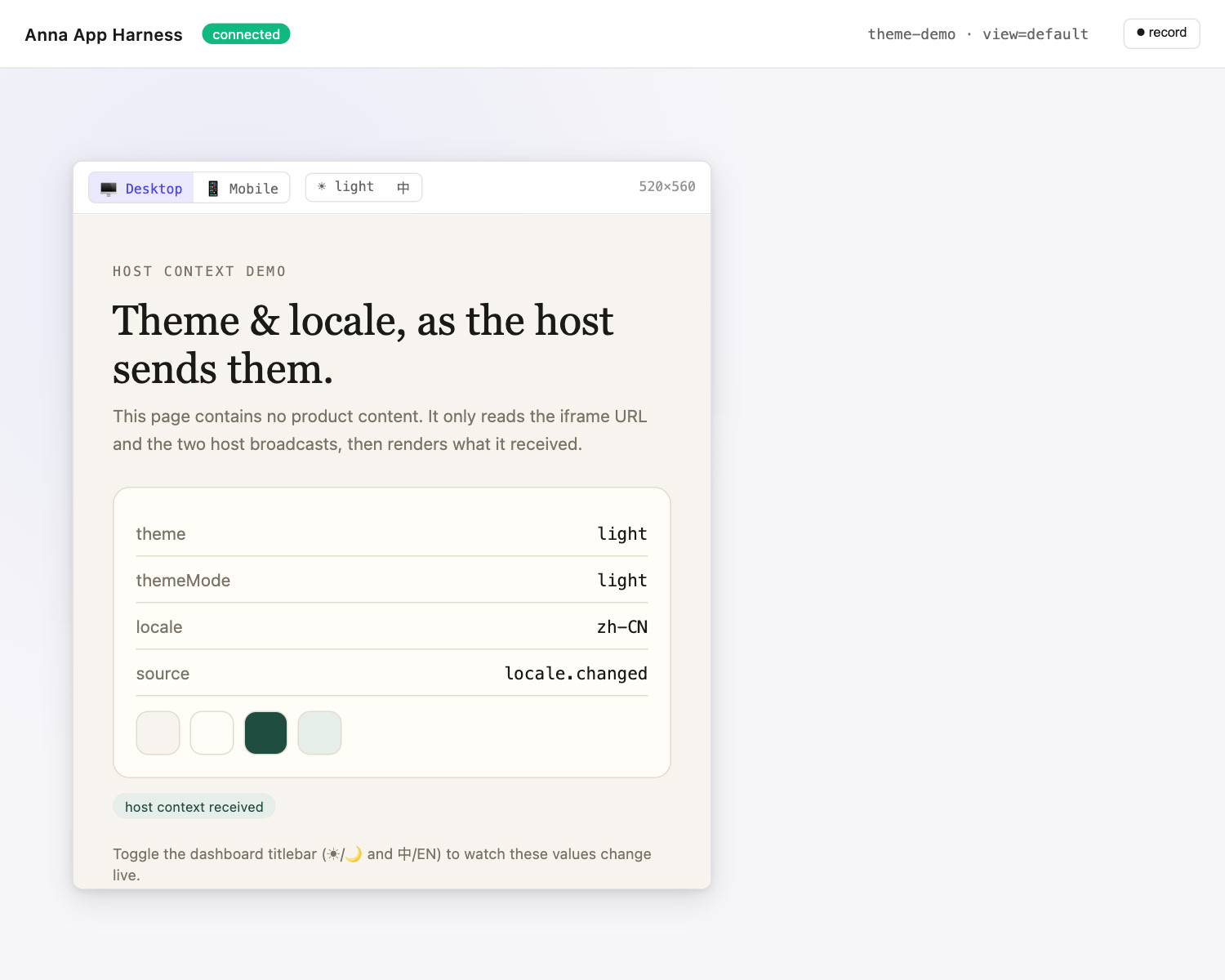
App UI: host theme & locale are delivered but undocumented (theme.changed / locale.changed)
Category: App UI / developer experience
Environment: macOS arm64 · Node 22.14 · @anna-ai/cli 0.1.64 · anna-app-runtime-local 0.2.0a33 · App SDK 0.27.0
Summary
The dashboard already sends the resolved theme and UI language to an App iframe, but the developer docs don’t mention the contract. A freshly scaffolded App ignores both titlebar controls (☀/🌙 and 中/EN), so they look broken even though the host is sending the values correctly.
I only found the contract by reading the local harness source, which explicitly says it mirrors what the production dashboard sends.
What the host sends
1) Initial values on the iframe URL
/anna-apps/<slug>/dev/index.html?wid=…&t=…&theme=dark&themeMode=dark&lang=en-US
theme:light|dark— the resolved theme the App should render.themeMode:system|light|dark— the user’s preference.lang:zh-CN|en-US— the UI language.
2) Live changes via postMessage
{ wid, kind: "event", event: "theme.changed", payload: { theme: "dark", mode: "dark" } }
{ wid, kind: "event", event: "locale.changed", payload: { lang: "en-US" } }
window.hello / AnnaAppRuntime.connect() capabilities do not include theme or locale. Apps have to read the URL and subscribe to these window events themselves.
Impact
- Every App must reverse-engineer this. Most will hard-code light/zh and silently ignore the user’s choice.
- To a user, two visible controls simply do nothing.
- Dark mode is an expected App Store quality bar; without this contract, every builder ships light-only.
- UI language is the same problem for any non-English App.
Reproduction
anna-app init demo --slug demoanna-app dev --no-llm- Open the harness dashboard and click
☀/🌙and中/EN. - The iframe stays on its hard-coded theme/language; nothing in the scaffold listens for the events.
Proposed fix
- Add a short Host context section to the App UI docs with the exact URL params and event names.
- Optionally expose
anna.host.theme/anna.host.langandonThemeChange/onLocaleChangein the SDK, or include both inwindow.hello. - Document that
themeModemay besystem, and thatthemeis the already-resolved value Apps should render.
What I ended up writing
const params = new URLSearchParams(window.location.search);
const [theme, setTheme] = useState(params.get("theme") === "dark" ? "dark" : "light");
const [lang, setLang] = useState(
  params.get("lang")?.startsWith("en") ? "en-US" : "zh-CN",
);

useEffect(() => {
  document.documentElement.dataset.theme = theme;
  document.documentElement.style.colorScheme = theme;
}, [theme]);

useEffect(() => {
  document.documentElement.lang = lang === "zh-CN" ? "zh-CN" : "en";
}, [lang]);

useEffect(() => {
  const onMessage = (event: MessageEvent) => {
    const data = event.data;
    if (!data || data.kind !== "event") return;

    if (data.event === "theme.changed") {
      const next = data.payload?.theme;
      if (next === "light" || next === "dark") setTheme(next);
    }
    if (data.event === "locale.changed") {
      const next = String(data.payload?.lang ?? "");
      if (next.startsWith("en")) setLang("en-US");
      else if (next.startsWith("zh")) setLang("zh-CN");
    }
  };
  window.addEventListener("message", onMessage);
  return () => window.removeEventListener("message", onMessage);
}, []);
Evidence
docs/forum/assets/harness-theme-locale.png— dashboard titlebar shows🌙 darkandEN; the iframe renders dark/English. The RPC log also showswindow.helloreturning capabilities without theme/locale.docs/forum/assets/welcome-dark-en.png— dark + EN at 390px.docs/forum/assets/thread-light-en.png/thread-light-zh.png— live switch back to light and back to Chinese without reload.
I’ve implemented this in a local App and verified dark/light and zh/en, including live switching without a reload. Happy to open a docs PR if that helps.